


1
Open your form
Start with a blank W-4 form PDF.
Complete a fillable W-4 online with MergedPDF’s platform and download the finished file to sign and submit to your employer.
 Click to start filling
 Start with a blank W-4 form PDF.
Provide your personal information, filing status, credits, and any applicable withholding adjustments.
Save your completed document, then sign it and provide it to your employer.
The official template, not an outdated copy.
Sign on screen — skip the print-and-scan loop.
TIN spacing and dates format as you type.
Download the PDF; we don't keep a copy.
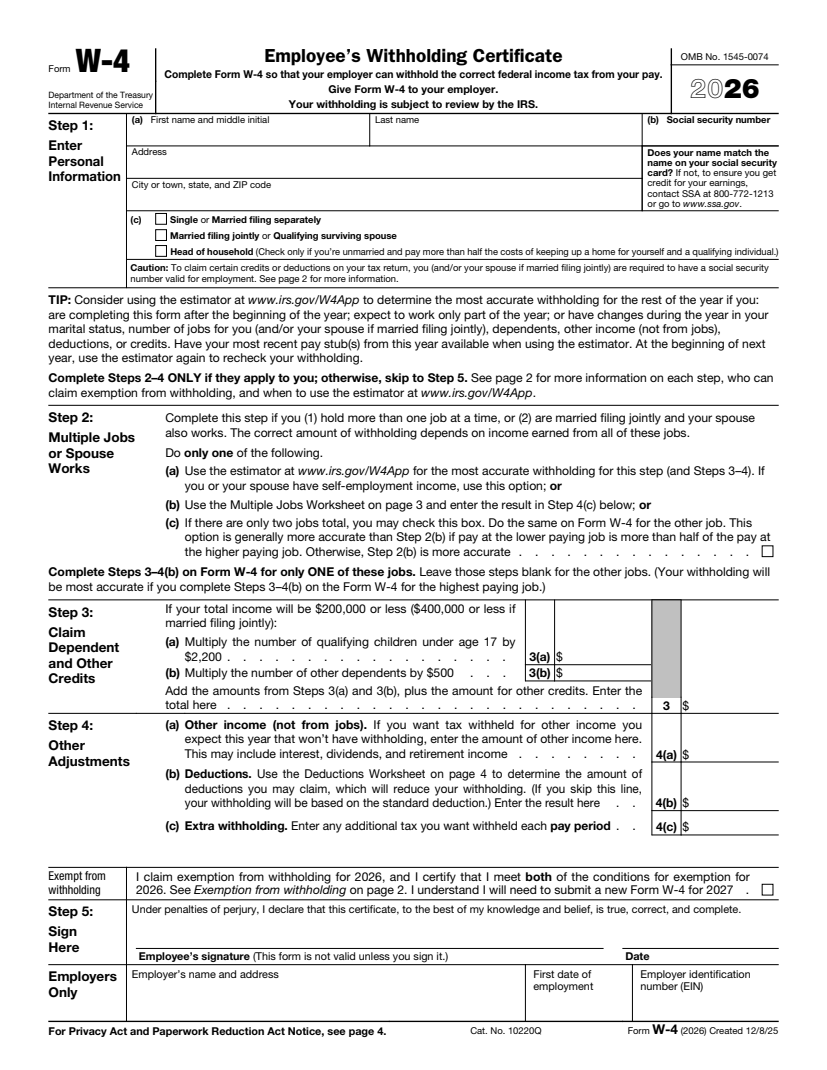
Form W-4, officially called the Employee’s Withholding Certificate, is an IRS document employees provide to their employers that helps determine how much federal income tax should be withheld from each paycheck.
You will normally need to complete an IRS Form W-4 when you:
I bring on ten to fifteen contractors a month and used to chase every one of them for a legible form. Now I send this link in the offer email and the signed PDF comes back the same day.
Half our vendors used to send forms as phone photos that finance refused to file. Pointing them here fixed it. The layout matches the official document and nothing gets cut off when it downloads.
What sold me is that the data isn't stored anywhere and the file downloads straight to the signer's machine. I can ask a client to complete one without worrying about where their details end up.
January used to mean tracking down paperwork from every subcontractor. This year I sent one link to the whole roster and had every form back inside a week.
New clients always want a fresh copy and I never have last year's handy. Filling it out here is faster than digging up the PDF, and the fields space themselves so I stop transposing digits.
I keep this bookmarked for the client who calls saying they need a form right now. I walk them through it on the phone in a couple of minutes — open, type, sign, download.
Most form questions come down to one confusing field. Ask in plain language and get an answer grounded in the official instructions, with an example for your situation.
Help for every box on the form
No tax jargon, real examples
Questions aren't tied to your form
Answers track the official form instructions — not generic web advice. When the form has a quirk, it explains it the way the instructions intend.
It explains what each box means and how people in your situation usually complete it. For a judgment call about your specific taxes, it'll point you to a professional rather than guess.
Go over the answers to the FAQs below to better understand how to fill out your blank W-4 Form.
The form is divided into five main steps: Personal information and anticipated filing status Multiple jobs or a working spouse Dependents and other tax credits Other income, deductions, and extra withholding Date and signature
An allowance was a pre-2020 withholding adjustment. The current Form W-4 no longer uses allowances; it relies on filing status, credits, income, and deductions.
Step 3 on the form covers qualifying children, other dependents, and eligible tax credits.
To claim exempt, you must have owed zero federal income tax last year and expect to owe zero this year, so if you qualify, just fill out the required fields, check the "exempt" box, and sign.
You complete Form W-4 to direct paycheck withholding. Your employer later issues Form W-2 to report annual wages and taxes already withheld.
This form is used to report to your employer how much federal tax to take out of your paychecks, depending on your filing status and any adjustments you make.
Extra withholding is an additional dollar amount taken from every paycheck. Enter it in Step 4(c) to reduce a possible tax balance or increase a refund.
Yes, you must account for multiple jobs in Step 2 when you hold another job or file jointly with a working spouse to avoid possible underwithholding.
No. Complete Step 3 only for dependents and credits you reasonably expect to claim. Leaving it blank simply excludes those credits from withholding calculations.
Select "married filing jointly" in Step 1, complete Step 2 if your spouse works, enter applicable credits and adjustments once, then sign the form.
Tax liability is the federal income tax you owe for the year. It helps determine appropriate withholding and whether you qualify to claim an exemption.
Select "Single" or "Married filing separately" in Step 1. Complete Steps 2 through 4 only when applicable, then sign and download your form through MergedPDF.
The right amount to withhold ultimately depends on your income, filing status, credits, deductions, and other jobs. To figure this out, you can use the IRS estimator, then complete your W-4 in our platform.
Select "married filing jointly" in the first step, then complete Step 2 if your spouse works, enter applicable credits and adjustments once, and then sign the form.
Generally, yes. Submit a new Form W-4 whenever your circumstances or withholding goals change; your employer must implement it within the IRS-required timeframe.
Review your filing status, multiple jobs, dependents, other income, deductions, and extra withholding. Complete and sign the W-4 form, then give it to your employer.
The purpose of Form W-4 is to help your employer calculate federal income tax withholding so your paycheck deductions better match your expected tax liability.
Complete a separate W-4 for each job. Use Step 2’s estimator, worksheet, or two-jobs checkbox, and enter credits primarily on the highest-paying job’s form.
The redesigned Form W-4 removed allowances in 2020 to improve simplicity, transparency, and accuracy after tax-law changes eliminated personal and dependency exemptions.
To increase a potential refund, request extra withholding in Step 4(c). Use the IRS estimator first, so you understand the effect on each paycheck.
Use the IRS estimator or Multiple Jobs Worksheet, then enter only the calculated extra amount in Step 4(c), without listing your spouse’s income.
Your employer must generally withhold as though you selected "Single" or "Married, filing separately" with no entries in Steps 2 through 4.
Your employer may apply it sooner, but must generally use the revised Form W-4 by the first payroll period ending at least 30 days after receipt.
Update it within 10 days when a personal change reduces the withholding you may claim and could leave insufficient tax withheld for the year.
Yes. Exempt status lasts one year. Submit a new Form W-4 by February 15 each year, or the applicable IRS deadline, to continue it.
An honest mistake does not typically lead to a fine. However, unsupported statements that reduce withholding can trigger a $500 penalty and possible underpayment charges.
If you make claims that are untrue on purpose to reduce withholding, you could be fined. This could lead to a $500 civil penalty, IRS review, and potentially criminal consequences.
If you notice a mistake, you should contact payroll promptly. Employers can correct excess current-year withholding; if it is not repaid, your W-2 should report the actual amount for your tax return.