


1
Open your blank W-2 form
Choose the correct tax year and start with a blank W-2 form.
Need to prepare an employee’s W-2? Use our guided template to enter wage and withholding details, review each box, and download your completed W-2 tax form.
 Click to start filling
 Choose the correct tax year and start with a blank W-2 form.
Add the following details: employer, employee, wage, benefit, and tax withholding details from your payroll records.
Review each entry and get a W-2 form online for distribution and your next filing step.
The official template, not an outdated copy.
Sign on screen — skip the print-and-scan loop.
TIN spacing and dates format as you type.
Download the PDF; we don't keep a copy.
A W-2 form, which is officially called the Wage and Tax Statement, reports an employee’s annual wages and the taxes withheld from their pay. Employers prepare the W-2 form, provide copies to the employee, and submit the required information to the Social Security Administration and, where applicable, state or local tax agencies.
Employers need to prepare Form W-2 for their employees if the following applies:
I bring on ten to fifteen contractors a month and used to chase every one of them for a legible form. Now I send this link in the offer email and the signed PDF comes back the same day.
Half our vendors used to send forms as phone photos that finance refused to file. Pointing them here fixed it. The layout matches the official document and nothing gets cut off when it downloads.
What sold me is that the data isn't stored anywhere and the file downloads straight to the signer's machine. I can ask a client to complete one without worrying about where their details end up.
January used to mean tracking down paperwork from every subcontractor. This year I sent one link to the whole roster and had every form back inside a week.
New clients always want a fresh copy and I never have last year's handy. Filling it out here is faster than digging up the PDF, and the fields space themselves so I stop transposing digits.
I keep this bookmarked for the client who calls saying they need a form right now. I walk them through it on the phone in a couple of minutes — open, type, sign, download.
Most form questions come down to one confusing field. Ask in plain language and get an answer grounded in the official instructions, with an example for your situation.
Help for every box on the form
No tax jargon, real examples
Questions aren't tied to your form
Answers track the official form instructions — not generic web advice. When the form has a quirk, it explains it the way the instructions intend.
It explains what each box means and how people in your situation usually complete it. For a judgment call about your specific taxes, it'll point you to a professional rather than guess.
Get answers for FAQs regarding W-2 forms to better understand how to create your document.
Before using the W-2 form online, gather the following: The correct tax year The employer’s legal name, address, and Employer Identification Number The employee’s name, address, and Social Security number Total wages, tips, and other taxable compensation Federal income tax withheld Social Security and Medicare wages and taxes Applicable benefits, retirement contributions, and Box 12 codes State and local wages and tax withholding, when required
A key responsibility for employers involves distributing W-2 tax forms to their workforce. This distribution must generally occur no later than January 31st, immediately following the close of the tax year, unless this day falls on a holiday or weekend. If that's the case, it will be pushed to the next business day.
Contact your former employer’s payroll or HR department and check any employee portal you previously used. If the company has closed or does not respond, contact the IRS and use your final pay stub to help reconstruct the information.
Overtime pay is included in Boxes 1, 3, and 5 when applicable. On the 2026 Form W-2, qualified overtime compensation is also reported separately in Box 12 with Code TT to help determine eligibility for the overtime deduction.
Code DD in Box 12 shows the total cost of employer-sponsored health coverage, generally including both employer and employee contributions. It is provided for informational purposes and usually does not mean that the reported amount is taxable.
You may file using Form 4852 once you have contacted both your employer and the IRS. Use your final pay stub to estimate your wages and any withheld amounts. Should your W-2 later report discrepancies, amending your tax return may be required.
Box 12 reports certain benefits, contributions, and compensation using letter codes. These may include retirement contributions, health savings account contributions, group-term life insurance, and deferred compensation. The code beside each amount explains what it represents.
Form W-2 reports wages and withheld taxes for an employee, while Form 1099 generally reports payments to contractors or other nonemployees, who usually manage their own income and self-employment taxes instead of having payroll taxes withheld.
Employees complete Form W-4 to tell their employer how much federal income tax to withhold. When it comes to Form W-2, employers prepare the document after the tax year to report the employee’s actual wages, benefits, and taxes withheld.
Box 14 reports additional information chosen by the employer, such as union dues, state disability tax, or educational assistance. On the 2026 form, Box 14a contains this information, while Box 14b reports Treasury tipped occupation codes.
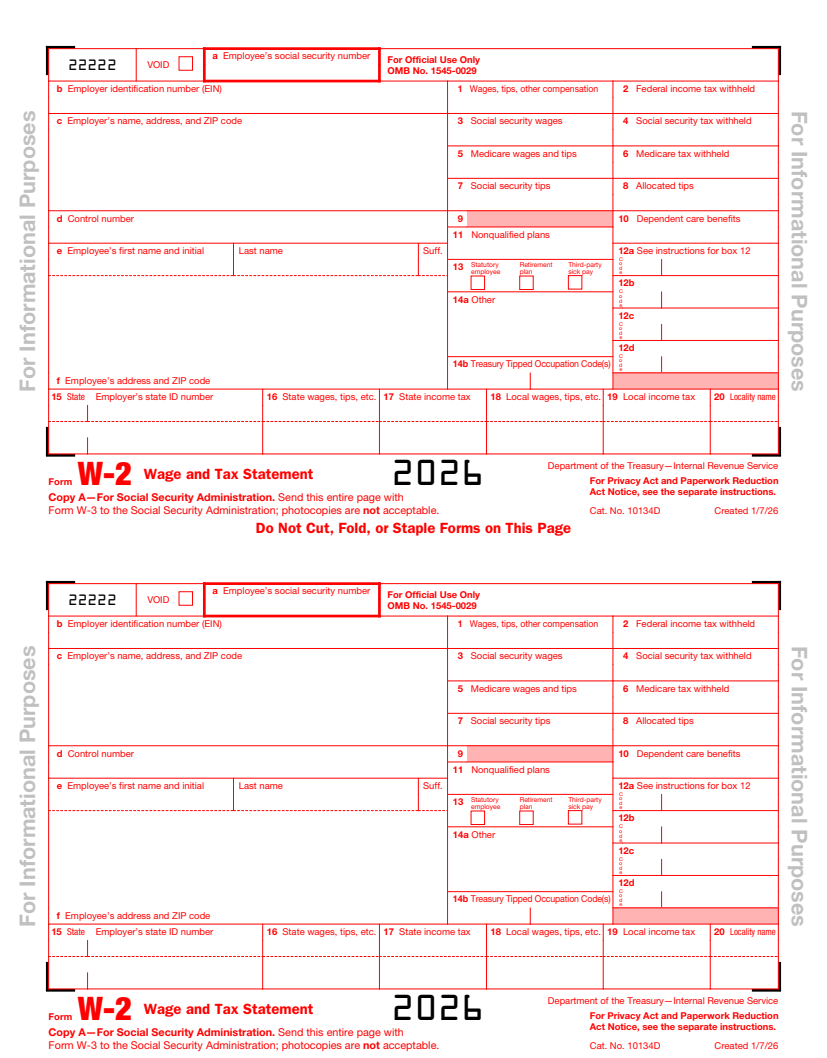
Start with the identifying information in Boxes a through f. Boxes 1 through 8 cover wages and taxes, Boxes 10 through 14 show benefits and other compensation, and Boxes 15 through 20 contain state and local information.
You cannot calculate your adjusted gross income from Form W-2 alone. Box 1 provides your taxable wages, but AGI also includes other income and eligible adjustments. Your completed AGI generally appears on Line 11 of Form 1040.
Form W-2 is a multi-copy wage statement containing identifying fields and numbered boxes. An example W-2 form shows sections for wages, federal taxes, Social Security and Medicare taxes, benefits, retirement contributions, and state or local tax information.
A W-2 form is an employer-issued statement reporting your wages and withheld taxes. On the other hand, Form 1040 is the individual income tax return you submit to the IRS using information from your W-2 and other tax documents.
Box 1 reports wages, tips, bonuses, and other compensation subject to federal income tax. It may be lower than your gross pay because certain pretax contributions, such as eligible retirement or health benefits, are excluded.
The control number in Box d is an optional code employers use to identify or organize W-2 forms in their payroll system. It is not your Social Security number or the employer’s EIN and usually has no effect on your taxes.
You can find your employer’s EIN or FEIN in Box b of Form W-2. This nine-digit federal tax number identifies the employer and is different from the control number shown in Box d.
Code D in Box 12 reports elective pretax contributions to a 401(k) plan, including certain SIMPLE retirement accounts that form part of a 401(k). It does not represent the employer’s matching contributions.
Code W in Box 12 reports employer contributions to your Health Savings Account. It also includes pretax HSA contributions you made through a Section 125 cafeteria plan, even though those amounts came from your pay.
Code C in Box 12 reports the taxable cost of employer-provided group-term life insurance coverage over $50,000. This amount is generally included in taxable Social Security and Medicare wages.
Code AA in Box 12 reports designated Roth contributions to a 401(k) plan. These contributions are made with after-tax income, so they generally do not reduce the taxable wages shown in Box 1.
Box 3 shows wages subject to Social Security tax, up to the annual wage limit. It can differ from Box 1 because some income or pretax benefits receive different treatment for federal income and Social Security taxes.
This checkbox means you are treated as an employee for Social Security and Medicare taxes but may report related income and business expenses on Schedule C. Statutory employees include certain drivers, salespeople, and insurance agents who meet IRS requirements.
Box 5 shows wages and tips subject to Medicare tax. Unlike Social Security wages in Box 3, Medicare wages do not have an annual maximum, so Box 5 may be higher than Boxes 1 or 3.
Box 7 reports tips you told your employer about that were subject to Social Security tax. These tips are generally also included in the wage totals reported in Boxes 1 and 5.
A masked SSN showing only the last four digits is permitted on employee copies. If the digits are incorrect, contact your employer immediately. The employer should correct its records and issue Form W-2c when necessary.
Box 11 reports certain distributions or taxable amounts from a nonqualified deferred compensation plan. It is not used for ordinary qualified retirement plans such as a standard 401(k), and its tax treatment depends on the type of payment.
“Cafe 125” usually identifies pretax benefits provided through a Section 125 cafeteria plan, such as health insurance or flexible spending accounts. The label is employer-specific and often appears in Box 14, so ask payroll what the amount represents.
Boxes 12a through 12d are simply four spaces for reporting different coded items. The letters do not indicate different tax categories. Each entry’s separate code, such as D, DD, or W, explains what the amount means.
Boxes 15 through 17 report the state, employer’s state ID number, state wages, and state income tax. Boxes 18 through 20 report local wages, local income tax, and the name of the applicable locality.
Box 10 shows dependent care benefits provided through an employer’s assistance program, including eligible dependent care FSA contributions. Any amount exceeding the applicable tax-free limit may also be included in taxable wages.
Contact your employer if your name is wrong and request a correction, which may require Form W-2c. An address-only error usually does not require a corrected W-2, but you should update your address with the employer.
You may receive multiple W-2 forms because of different state or local reporting, separate employer EINs, or additional Box 12 entries. Enter every valid form once, but ask payroll about any forms that appear to duplicate the same wages.