


1
Open our FedEx Release Form template
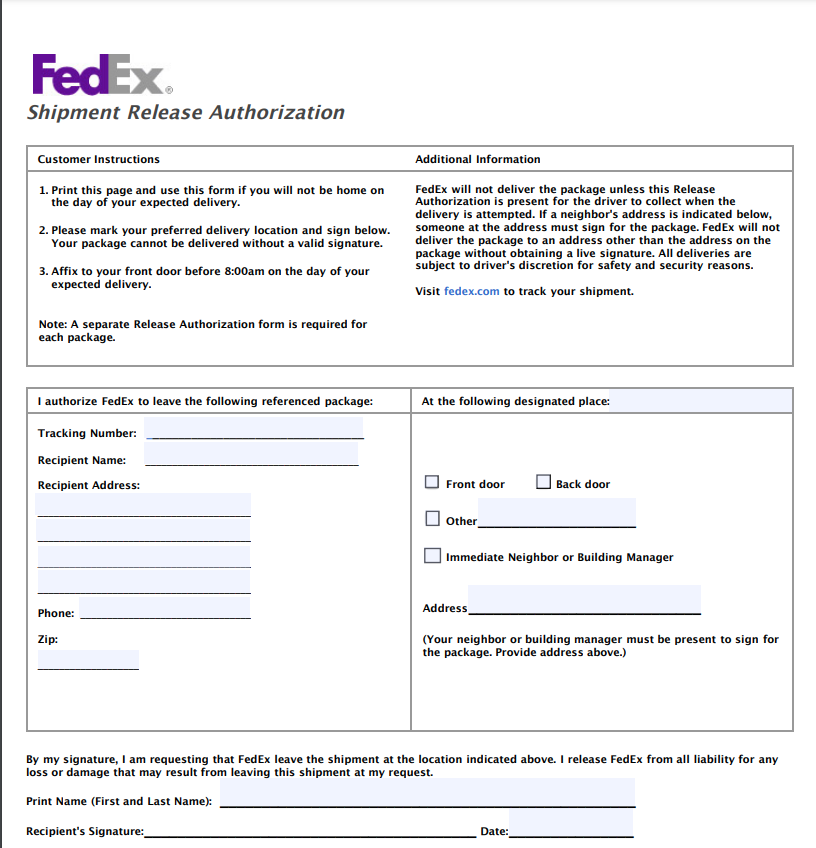
Start with our FedEx door tag release form.
Add your FedEx package and delivery details using our simple template, then download your completed copy.
 Click to start filling
 Start with our FedEx door tag release form.
Enter the package and delivery information.
Save your completed copy for reference.
The official template, not an outdated copy.
Sign on screen — skip the print-and-scan loop.
TIN spacing and dates format as you type.
Download the PDF; we don't keep a copy.
A FedEx door tag is a notice left after a delivery attempt. It explains whether the package was delivered, will be redelivered, or is being held for pickup. For eligible indirect-signature shipments, the tag may also include a form you can sign to authorize release.
You may need to complete the release section if:
I bring on ten to fifteen contractors a month and used to chase every one of them for a legible form. Now I send this link in the offer email and the signed PDF comes back the same day.
Half our vendors used to send forms as phone photos that finance refused to file. Pointing them here fixed it. The layout matches the official document and nothing gets cut off when it downloads.
What sold me is that the data isn't stored anywhere and the file downloads straight to the signer's machine. I can ask a client to complete one without worrying about where their details end up.
January used to mean tracking down paperwork from every subcontractor. This year I sent one link to the whole roster and had every form back inside a week.
New clients always want a fresh copy and I never have last year's handy. Filling it out here is faster than digging up the PDF, and the fields space themselves so I stop transposing digits.
I keep this bookmarked for the client who calls saying they need a form right now. I walk them through it on the phone in a couple of minutes — open, type, sign, download.
Most form questions come down to one confusing field. Ask in plain language and get an answer grounded in the official instructions, with an example for your situation.
Help for every box on the form
No tax jargon, real examples
Questions aren't tied to your form
Answers track the official form instructions — not generic web advice. When the form has a quirk, it explains it the way the instructions intend.
It explains what each box means and how people in your situation usually complete it. For a judgment call about your specific taxes, it'll point you to a professional rather than guess.
Review these common questions to understand how to complete and use a FedEx door tag release correctly.
You can fill out our template and leave it on your door, explaining the delivery instructions.
You sign the specific package release section of the door tag, and place it on your door. The delivery driver will then have permission to leave the package near your front door if no one is home next time they try to deliver.
A FedEx door tag is a number that allows you to track the records of the package online or in the FedEx app. It starts with DT and then shows 12 numbers. It usually appears near the bottom of the tag.
You should only sign on the specific release area, nowhere else. The driver may not accept it if you sign anywhere else. Our template shows you exactly where to write all necessary details and where to sign.
The following cannot be authorized with a FedEx door tag: Direct signature: Requires someone at the delivery address Adult signature: Requires someone over 21 at the address. They must show government-issued identification
No, this is usually not the function of a door tag. The tag may tell you that your package is already being held nearby. You can request a new location for FedEx to hold your package through FedEx Delivery Manager.
FedEx typically makes up to three attempts when a signature is required.
You can still track and manage your package using either: The original tracking number FedEx Delivery Manager
No, usually you are the only person who can sign the FedEx door tag. However, a neighbour can usually sign for delivery if you’re not home.
No, you do not write your own instructions on a door tag. However, you can give the driver drop-off instructions through FedEx Delivery Manager.
No, signing the form does not guarantee release. FedEx may not leave the package if the location is: Unsafe The shipment is restricted The package is damaged Another signature or security requirement applies
You can use FedEx Delivery Manager to check whether a different delivery date or time is available.
The exact effect of signing the FedEx release form depends on the release wording and FedEx terms. You should review the authorization carefully before signing.
Packages with a declared value of $500 or more automatically receive Direct Signature Required for many U.S. services. This means that FedEx may refuse unattended release.
Its instructions apply only to that specific shipment and delivery attempt described on the door tag. It is not valid beyond this delivery attempt.
Use FedEx Delivery Manager if the shipment allows an electronic indirect signature. You can also request: A vacation hold for up to 14 days To redirect an eligible package to a pickup location
You must put the signed tag only where its instructions direct, which is normally on your door.